Segmenting WhatsApp Audiences Using Custom Tags & Activity Logs
Segmenting contacts using custom lead-stage tags and activity logs prevents audience fatigue, lowers opt-out rates, and maximizes ROI over mass un-targeted broadcasts.
Table of Contents
Introduction: Why Targeted Segmentation Beats Generic Mass Blasts
Dispatching identical promotional broadcasts to your entire contact database leads to subscriber fatigue, increased spam blocks, and dropping open rates — putting your campaigns at risk of GDPR non-compliance. Segmenting audiences by interest, purchase history, or stage in the sales funnel ensures relevant messaging.
In this guide, we show you how to structure tag taxonomies inside Patify to send highly targeted campaigns.
1. Structuring an Effective Tag Taxonomy
Organize contacts into logical tag groups inside Patify:
- Lifecycle Stage:
Lead-Inbound,Demo-Scheduled,Customer-Active,Churn-Risk. - Product Interest:
Product-SaaS,Product-Enterprise,Promo-Q3. - Engagement Status:
Highly-Engaged,Unresponsive-30D.
2. Dispatching Precision Campaigns
When creating a broadcast campaign inside Patify, combine tag rules (e.g. Target Product-Enterprise AND Lead-Inbound, excluding Unsubscribed) to ensure maximum campaign relevance and conversions.
3. Analyzing Delivery Receipts & Engagement Logs
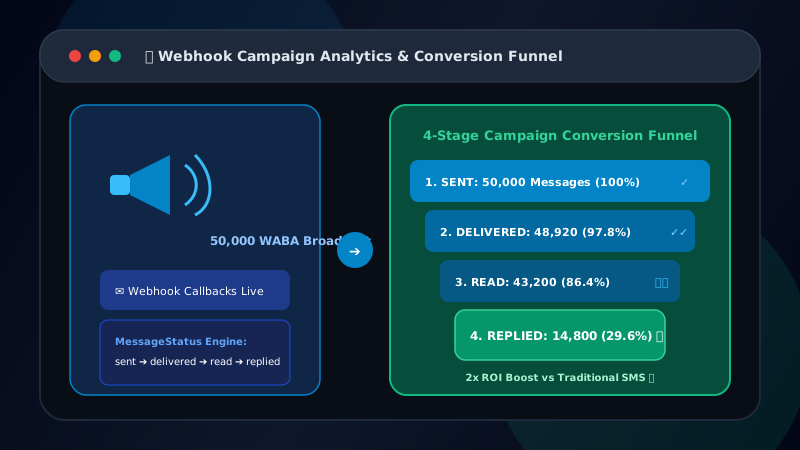
Monitor message status receipts (Sent, Delivered, Read) to filter out inactive phone numbers and refine future target segments. Pair with interactive Quick Reply buttons to capture intent signals directly inside your campaigns. For hands-off automation, set up auto-tagging leads from interactive button replies to triage inbound interest without manual staff effort.
Ready to Scale Your WhatsApp Marketing?
Access Meta WABA official API, automated broadcast campaigns, and multi-agent live chat for your enterprise.