How to Use Interactive Button & List Replies to Auto-Tag & Segment WhatsApp Leads
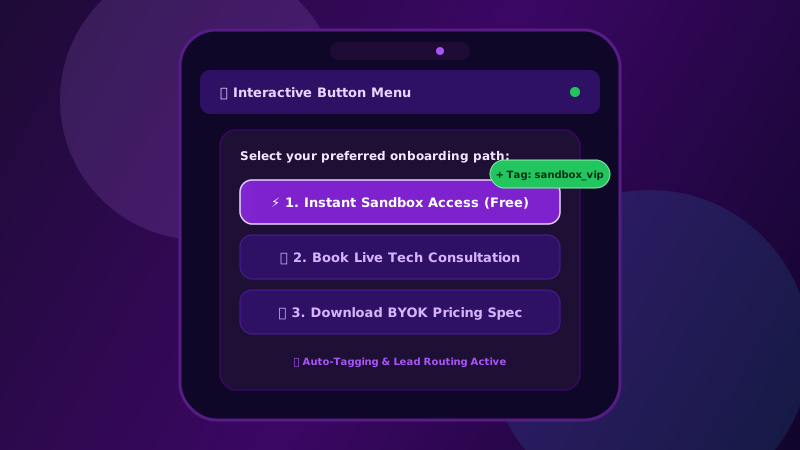
Interactive button replies eliminate customer friction. When a recipient taps a button or list option, Patify automatically extracts the choice title and auto-attaches Spatie tags for zero-touch audience segmentation.
Table of Contents
Why Interactive Buttons Outperform Text Links
Traditional SMS and email marketing rely on long, intimidating URLs that recipients rarely tap. In WhatsApp marketing, Meta's Interactive Message API allows businesses to include quick reply buttons and selection lists directly inside the chat thread.
Studies across B2B and e-commerce campaigns show that interactive WhatsApp buttons increase click-through rates by up to 300% compared to plain text messages containing inline links. To learn the full mechanics of designing interactive templates, review our complete Interactive WhatsApp Buttons & Quick Replies Guide.
How Patify Handles Interactive Webhooks
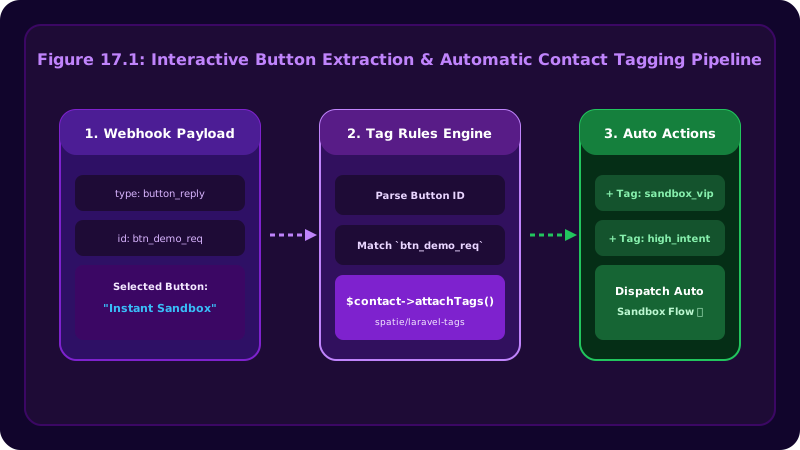
When a recipient taps a button (such as "Book Demo" or "Get Pricing"), Meta dispatches an inbound webhook containing the button_reply or list_reply payload.
Patify's inbound webhook engine instantly processes this response:
- Title Extraction: Reads the exact text title of the button tapped by the user.
- Automatic Spatie Tagging: Auto-attaches a tag formatted as
Button:</code> (e.g. <code>Button: Book Demo</code>) to the recipient's contact profile. Learn how these tags power broadcast funnels in our guide on <a href="https://patify.in/blog/segmenting-whatsapp-audiences-with-custom-tags">Segmenting Audiences with Custom Tags</a>.</li> <li><strong>AI Persona Context Feed:</strong> Passes the tapped button choice into the 24/7 AI Auto-Responder context, enabling tailored follow-up answers without manual agent intervention.</li> </ol> <h2 id="best-practices-for-interactive-templates" class="scroll-mt-24">Best Practices for Interactive Templates</h2> <ul> <li><strong>Keep Button Labels Short:</strong> Meta limits button titles to 20 characters maximum. Use action verbs like "Buy Now", "Claim 20% Off", or "Speak to Rep".</li> <li><strong>Limit Button Count:</strong> Use 1 to 3 Quick Reply buttons per message to prevent decision paralysis.</li> <li><strong>Combine with Audience Tags:</strong> Target future broadcast campaigns to contacts tagged with specific button choices for hyper-relevant messaging.</li> <li><strong>Pair with Welcome Greetings:</strong> Add interactive choice buttons to <a href="https://patify.in/blog/first-time-contact-welcome-greetings-boost-lead-retention">Automated Welcome Greetings</a> so new leads can self-qualify instantly.</li> </ul> <div class="my-12 p-8 rounded-2xl bg-gradient-to-r from-slate-900 to-slate-800 text-white border border-emerald-500/30 text-center relative overflow-hidden shadow-xl"> <div class="relative z-10"> <h3 id="build-interactive-whatsapp-campaigns" class="scroll-mt-24" class="text-2xl font-extrabold text-white mb-2">Build Interactive WhatsApp Campaigns</h3> <p class="text-slate-300 text-sm max-w-xl mx-auto mb-6">Patify automatically tags leads when they tap buttons in broadcasts</p> <button onclick="window.openEnquiryModal()" class="px-6 py-3 bg-emerald-500 hover:bg-emerald-400 text-slate-950 font-bold text-sm rounded-xl shadow-xl shadow-emerald-500/20 transition-all hover:-translate-y-0.5 cursor-pointer"> Create Your First Template </button> </div> </div> </div> </article> <section class="max-w-4xl mx-auto px-4 sm:px-6 lg:px-8 py-10 border-t border-slate-200 dark:border-slate-800"> <div class="grid grid-cols-2 gap-4"> <div> <a href="https://patify.in/blog/whatsapp-marketing-playbook-7-step-campaign-launch-checklist" class="group flex flex-col gap-1.5 p-5 rounded-2xl border border-slate-200 dark:border-white/10 hover:border-emerald-500/40 transition-all hover:-translate-y-0.5 bg-white dark:bg-slate-900/40 h-full"> <span class="text-xs font-bold text-slate-400 dark:text-slate-500 uppercase tracking-wider flex items-center gap-1.5"> <svg xmlns="http://www.w3.org/2000/svg" class="pat-svg-icon w-3.5 h-3.5" viewBox="0 0 24 24" fill="none" stroke="currentColor" stroke-width="2"><path stroke-linecap="round" stroke-linejoin="round" d="M10 19l-7-7m0 0l7-7m-7 7h18"/></svg> Previous </span> <span class="text-sm font-semibold text-slate-800 dark:text-white group-hover:text-emerald-600 dark:group-hover:text-emerald-400 transition-colors line-clamp-2 leading-snug">The Complete WhatsApp Marketing Playbook: 7-Step Campaign Launch Checklist for SMBs</span> </a> </div> <div class="flex justify-end"> <a href="https://patify.in/blog/mastering-dynamic-template-variables-pattify-broadcasts" class="group flex flex-col gap-1.5 p-5 rounded-2xl border border-slate-200 dark:border-white/10 hover:border-emerald-500/40 transition-all hover:-translate-y-0.5 bg-white dark:bg-slate-900/40 text-right w-full h-full"> <span class="text-xs font-bold text-slate-400 dark:text-slate-500 uppercase tracking-wider flex items-center justify-end gap-1.5"> Next <svg xmlns="http://www.w3.org/2000/svg" class="pat-svg-icon w-3.5 h-3.5" viewBox="0 0 24 24" fill="none" stroke="currentColor" stroke-width="2"><path stroke-linecap="round" stroke-linejoin="round" d="M14 5l7 7m0 0l-7 7m7-7H3"/></svg> </span> <span class="text-sm font-semibold text-slate-800 dark:text-white group-hover:text-emerald-600 dark:group-hover:text-emerald-400 transition-colors line-clamp-2 leading-snug">Mastering Dynamic Template Variables: How to Personalize Mass Broadcasts in Patify</span> </a> </div> </div> </section> <section class="bg-slate-50 dark:bg-slate-900/40 border-t border-slate-200 dark:border-slate-800 py-14"> <div class="max-w-4xl mx-auto px-4 sm:px-6 lg:px-8"> <div class="flex items-center gap-3 mb-8"> <span class="w-6 h-0.5 bg-emerald-500 rounded-full"></span> <h2 class="text-sm font-bold text-slate-900 dark:text-white uppercase tracking-wider"> More in WABA Features </h2> </div> <div class="grid grid-cols-1 sm:grid-cols-2 lg:grid-cols-3 gap-6"> <article class="bg-white dark:bg-slate-900 border border-slate-200 dark:border-white/10 rounded-2xl overflow-hidden hover:border-emerald-500/40 transition-all hover:-translate-y-1 group flex flex-col shadow-sm"> <a href="https://patify.in/blog/internal-staff-notes-collaborate-privately-whatsapp-chats" class="block aspect-video overflow-hidden bg-slate-900 relative"> <img src="https://patify.in/images/blog/2026/09/waba_post20_notes.svg" alt="Internal Staff Notes: How Support Teams Collaborate Privately Inside WhatsApp Chat Threads" class="w-full h-full object-cover group-hover:scale-105 transition-transform duration-500"> <span class="absolute top-3 left-3 bg-slate-950/80 backdrop-blur-md text-emerald-400 text-xs font-bold px-2.5 py-1 rounded-md border border-white/10"> WABA Features </span> </a> <div class="p-5 flex flex-col flex-grow"> <div class="flex items-center text-xs text-slate-500 dark:text-slate-400 gap-2 mb-2"> <span>Sep 17, 2026</span> <span>•</span> <span>2 min read</span> </div> <h3 class="text-sm font-bold text-slate-900 dark:text-white group-hover:text-emerald-500 dark:group-hover:text-emerald-400 transition-colors line-clamp-2 mb-3 flex-grow"> <a href="https://patify.in/blog/internal-staff-notes-collaborate-privately-whatsapp-chats">Internal Staff Notes: How Support Teams Collaborate Privately Inside WhatsApp Chat Threads</a> </h3> <a href="https://patify.in/blog/internal-staff-notes-collaborate-privately-whatsapp-chats" class="inline-flex items-center text-xs font-bold text-emerald-600 dark:text-emerald-400 hover:text-emerald-500 gap-1 mt-auto"> Read Article <svg xmlns="http://www.w3.org/2000/svg" class="pat-svg-icon w-3.5 h-3.5" viewBox="0 0 24 24" fill="none" stroke="currentColor" stroke-width="2"><path stroke-linecap="round" stroke-linejoin="round" d="M14 5l7 7m0 0l-7 7m7-7H3"/></svg> </a> </div> </article> <article class="bg-white dark:bg-slate-900 border border-slate-200 dark:border-white/10 rounded-2xl overflow-hidden hover:border-emerald-500/40 transition-all hover:-translate-y-1 group flex flex-col shadow-sm"> <a href="https://patify.in/blog/multi-agent-whatsapp-live-chat-setup-guide" class="block aspect-video overflow-hidden bg-slate-900 relative"> <img src="https://patify.in/images/blog/2026/08/waba_post12_livechat.svg" alt="How to Set Up Multi-Agent WhatsApp Live Chat for Your Sales & Support Team" class="w-full h-full object-cover group-hover:scale-105 transition-transform duration-500"> <span class="absolute top-3 left-3 bg-slate-950/80 backdrop-blur-md text-emerald-400 text-xs font-bold px-2.5 py-1 rounded-md border border-white/10"> WABA Features </span> </a> <div class="p-5 flex flex-col flex-grow"> <div class="flex items-center text-xs text-slate-500 dark:text-slate-400 gap-2 mb-2"> <span>Aug 18, 2026</span> <span>•</span> <span>3 min read</span> </div> <h3 class="text-sm font-bold text-slate-900 dark:text-white group-hover:text-emerald-500 dark:group-hover:text-emerald-400 transition-colors line-clamp-2 mb-3 flex-grow"> <a href="https://patify.in/blog/multi-agent-whatsapp-live-chat-setup-guide">How to Set Up Multi-Agent WhatsApp Live Chat for Your Sales & Support Team</a> </h3> <a href="https://patify.in/blog/multi-agent-whatsapp-live-chat-setup-guide" class="inline-flex items-center text-xs font-bold text-emerald-600 dark:text-emerald-400 hover:text-emerald-500 gap-1 mt-auto"> Read Article <svg xmlns="http://www.w3.org/2000/svg" class="pat-svg-icon w-3.5 h-3.5" viewBox="0 0 24 24" fill="none" stroke="currentColor" stroke-width="2"><path stroke-linecap="round" stroke-linejoin="round" d="M14 5l7 7m0 0l-7 7m7-7H3"/></svg> </a> </div> </article> <article class="bg-white dark:bg-slate-900 border border-slate-200 dark:border-white/10 rounded-2xl overflow-hidden hover:border-emerald-500/40 transition-all hover:-translate-y-1 group flex flex-col shadow-sm"> <a href="https://patify.in/blog/interactive-whatsapp-buttons-and-quick-replies-guide" class="block aspect-video overflow-hidden bg-slate-900 relative"> <img src="https://patify.in/images/blog/2026/07/waba_post6_buttons.webp" alt="Using Interactive Call-To-Action Buttons & Quick Replies to Triple Conversions" class="w-full h-full object-cover group-hover:scale-105 transition-transform duration-500"> <span class="absolute top-3 left-3 bg-slate-950/80 backdrop-blur-md text-emerald-400 text-xs font-bold px-2.5 py-1 rounded-md border border-white/10"> WABA Features </span> </a> <div class="p-5 flex flex-col flex-grow"> <div class="flex items-center text-xs text-slate-500 dark:text-slate-400 gap-2 mb-2"> <span>Jul 30, 2026</span> <span>•</span> <span>2 min read</span> </div> <h3 class="text-sm font-bold text-slate-900 dark:text-white group-hover:text-emerald-500 dark:group-hover:text-emerald-400 transition-colors line-clamp-2 mb-3 flex-grow"> <a href="https://patify.in/blog/interactive-whatsapp-buttons-and-quick-replies-guide">Using Interactive Call-To-Action Buttons & Quick Replies to Triple Conversions</a> </h3> <a href="https://patify.in/blog/interactive-whatsapp-buttons-and-quick-replies-guide" class="inline-flex items-center text-xs font-bold text-emerald-600 dark:text-emerald-400 hover:text-emerald-500 gap-1 mt-auto"> Read Article <svg xmlns="http://www.w3.org/2000/svg" class="pat-svg-icon w-3.5 h-3.5" viewBox="0 0 24 24" fill="none" stroke="currentColor" stroke-width="2"><path stroke-linecap="round" stroke-linejoin="round" d="M14 5l7 7m0 0l-7 7m7-7H3"/></svg> </a> </div> </article> </div> </div> </section> </main> <!-- Unified Lead / Registration Modal Popover --> <div x-data="{ open: false, title: 'Request Tenant Access', subtitle: 'Pay only for what you use. Zero contact markups.', show(mode = 'enquiry', tier = null) { this.open = true; if (mode === 'register') { this.title = 'Create Your Free Workspace'; this.subtitle = 'Instant access • 0% Meta markups • No credit card required'; } else { this.title = 'Request Tenant Access'; this.subtitle = 'Pay only for what you use. Zero contact markups.'; } if (typeof Livewire !== 'undefined') { Livewire.dispatch('set-mode', { mode: mode, tier: tier }); } } }" x-cloak x-init="$watch('open', value => value ? document.body.classList.add('overflow-hidden') : document.body.classList.remove('overflow-hidden'))" @open-lead-modal.window="show($event.detail?.mode ?? 'enquiry', $event.detail?.tier ?? null)" @open-enquiry.window="show('enquiry', $event.detail?.tier ?? null)" @open-enquiry-modal.window="show('enquiry')" @open-register-modal.window="show('register', 'free')" @keydown.escape.window="open = false" role="dialog" aria-modal="true" aria-labelledby="lead-modal-title" class="relative z-[100]" x-show="open" > <!-- Backdrop --> <div x-show="open" x-transition:enter="ease-out duration-300" x-transition:enter-start="opacity-0" x-transition:enter-end="opacity-100" x-transition:leave="ease-in duration-200" x-transition:leave-start="opacity-100" x-transition:leave-end="opacity-0" class="fixed inset-0 bg-slate-950/80 backdrop-blur-sm transition-opacity cursor-pointer" @click="open = false" ></div> <!-- Slide-over (Desktop) & Bottom Sheet (Mobile) Container --> <div class="fixed inset-0 z-10 flex flex-col justify-end sm:flex-row sm:justify-end sm:items-stretch pointer-events-none"> <!-- The Slide-over / Bottom Sheet Panel --> <div x-show="open" x-transition:enter="ease-out duration-300" x-transition:enter-start="translate-y-full sm:translate-y-0 sm:translate-x-full" x-transition:enter-end="translate-y-0 sm:translate-x-0" x-transition:leave="ease-in duration-200" x-transition:leave-start="translate-y-0 sm:translate-x-0" x-transition:leave-end="translate-y-full sm:translate-y-0 sm:translate-x-full" class="relative pointer-events-auto w-full sm:max-w-xl bg-white dark:bg-slate-900 flex flex-col sm:h-full max-h-[92vh] sm:max-h-screen rounded-t-3xl sm:rounded-none sm:rounded-l-3xl shadow-2xl transition-all transform overflow-hidden border-t sm:border-t-0 sm:border-l border-slate-200 dark:border-slate-800" > <!-- Header (Sticky Top) --> <div class="bg-gradient-to-r from-slate-900 to-slate-800 px-6 py-4 border-b border-slate-700/60 flex justify-between items-center text-white shrink-0"> <div class="flex items-center space-x-2"> <span class="w-2.5 h-2.5 rounded-full bg-emerald-500 animate-pulse"></span> <div> <h3 id="lead-modal-title" class="text-lg font-bold tracking-tight" x-text="title"></h3> <p class="text-xs text-slate-300" x-text="subtitle"></p> </div> </div> <button @click="open = false" type="button" aria-label="Close modal panel" class="text-slate-400 hover:text-white transition-colors p-1 focus:outline-none cursor-pointer"> <svg xmlns="http://www.w3.org/2000/svg" class="pat-svg-icon w-6 h-6" viewBox="0 0 24 24" fill="none" stroke="currentColor" stroke-width="2"><path stroke-linecap="round" stroke-linejoin="round" d="M6 18L18 6M6 6l12 12"/></svg> </button> </div> <!-- Body (Scrollable Content) --> <div class="px-6 py-6 sm:px-8 sm:py-8 overflow-y-auto flex-grow"> <div wire:key="lw-565354478-0" wire:snapshot="{"data":{"form":[{"business_name":"","business_email":"","business_sector":"","business_mobile_number":"","estimated_contacts":"free","use_case":""},{"class":"App\\Livewire\\Forms\\EnquiryForm","s":"form"}],"mode":"enquiry","honeypot":"","turnstileToken":"","successMessage":false},"memo":{"id":"IJgmYERQESFGjLYcGG5X","name":"lead-capture-form","path":"blog\/interactive-button-replies-auto-tagging-whatsapp-leads","method":"GET","release":"a-a-a","children":[],"scripts":[],"assets":["1528317126-0","332854130-0"],"errors":[],"locale":"en","islands":[]},"checksum":"87fa6a15e9ceb49686cf1abf830525ea542444c3256628383758ade89beaaaa1"}" wire:effects="{"partials":[],"listeners":["set-mode","set-tier"]}" wire:id="IJgmYERQESFGjLYcGG5X" wire:name="lead-capture-form"> <!--[if BLOCK]><![endif]--> <form wire:submit.prevent="submit" class="space-y-4"> <!-- Honeypot --> <div class="hidden" aria-hidden="true"> <label for="honeypot">Leave empty</label> <input type="text" wire:model="honeypot" id="honeypot" tabindex="-1" autocomplete="off"> </div> <div class="grid grid-cols-1 sm:grid-cols-2 gap-4"> <!-- Business Name Input --> <div class="relative"> <input type="text" wire:model.blur="form.business_name" id="form_business_name" class="peer w-full bg-slate-50 dark:bg-slate-800 border border-slate-200 dark:border-slate-700 rounded-xl px-4 pt-4 pb-2 text-slate-900 dark:text-white focus:outline-none focus:ring-2 focus:ring-emerald-500/50 focus:border-emerald-500 transition-all placeholder-transparent text-sm" placeholder="Business Name" required > <label for="form_business_name" class="absolute left-4 top-1 text-[10px] font-semibold text-slate-500 dark:text-slate-400 transition-all peer-placeholder-shown:text-xs peer-placeholder-shown:top-3 peer-focus:top-1 peer-focus:text-[10px] peer-focus:text-emerald-500">Business Name *</label> <!--[if BLOCK]><![endif]--><!--[if ENDBLOCK]><![endif]--> </div> <!-- Business Email Input --> <div class="relative"> <input type="email" wire:model.blur="form.business_email" id="form_business_email" class="peer w-full bg-slate-50 dark:bg-slate-800 border border-slate-200 dark:border-slate-700 rounded-xl px-4 pt-4 pb-2 text-slate-900 dark:text-white focus:outline-none focus:ring-2 focus:ring-emerald-500/50 focus:border-emerald-500 transition-all placeholder-transparent text-sm" placeholder="Business Email" required > <label for="form_business_email" class="absolute left-4 top-1 text-[10px] font-semibold text-slate-500 dark:text-slate-400 transition-all peer-placeholder-shown:text-xs peer-placeholder-shown:top-3 peer-focus:top-1 peer-focus:text-[10px] peer-focus:text-emerald-500">Business Email *</label> <!--[if BLOCK]><![endif]--><!--[if ENDBLOCK]><![endif]--> </div> </div> <div class="grid grid-cols-1 sm:grid-cols-2 gap-4"> <!-- Business Sector Dropdown --> <div class="relative"> <select wire:model.change="form.business_sector" id="form_business_sector" class="w-full bg-slate-50 dark:bg-slate-800 border border-slate-200 dark:border-slate-700 rounded-xl px-4 py-3 text-slate-900 dark:text-white focus:outline-none focus:ring-2 focus:ring-emerald-500/50 focus:border-emerald-500 transition-all text-sm cursor-pointer" required > <option value="" disabled selected>Select Industry Sector *</option> <!--[if BLOCK]><![endif]--> <option value="real_estate"> Real Estate & Housing </option> <option value="e_commerce"> E-Commerce & D2C Brands </option> <option value="healthcare"> Healthcare & Wellness Clinics </option> <option value="education"> Education, Coaching & Academies </option> <option value="automotive"> Automotive & Dealerships </option> <option value="financial_services"> Financial Services & Advisory </option> <option value="saas_tech"> Software & B2B Technology </option> <option value="hospitality"> Hospitality & Travel </option> <option value="retail"> Retail & Local Services </option> <option value="other"> General Business / Other </option> <!--[if ENDBLOCK]><![endif]--> </select> <!--[if BLOCK]><![endif]--><!--[if ENDBLOCK]><![endif]--> </div> <!-- Business Mobile Number (intl-tel-input with country picker) --> <div class="relative"> <div wire:ignore> <input type="tel" id="form_business_mobile_number" x-data x-init=" let checkIti = setInterval(() => { if (window.intlTelInput) { clearInterval(checkIti); const iti = window.intlTelInput($el, { initialCountry: 'in', separateDialCode: true, strictMode: true, autoPlaceholder: 'off', utilsScript: 'https://cdn.jsdelivr.net/npm/intl-tel-input@23.0.10/build/js/utils.js' }); $el.addEventListener('blur', () => { $wire.set('form.business_mobile_number', iti.getNumber()); }); } }, 50); " class="w-full bg-slate-50 dark:bg-slate-800 border border-slate-200 dark:border-slate-700 rounded-xl px-4 py-3 text-secondary dark:text-white text-sm focus:outline-none focus:ring-2 focus:ring-primary/50 focus:border-primary transition-all" maxlength="15" inputmode="tel" placeholder="Business WhatsApp / Mobile *" required> </div> <!--[if BLOCK]><![endif]--><!--[if ENDBLOCK]><![endif]--></div> </div> <!-- Plan Selection Dropdown --> <div class="relative"> <select wire:model.change="form.estimated_contacts" id="form_audience" class="w-full bg-slate-50 dark:bg-slate-800 border border-slate-200 dark:border-slate-700 rounded-xl px-4 py-3 text-slate-900 dark:text-white focus:outline-none focus:ring-2 focus:ring-emerald-500/50 focus:border-emerald-500 transition-all text-sm cursor-pointer" required > <!--[if BLOCK]><![endif]--> <option value="free" > Sandbox (Free) Plan </option> <option value="starter" > PAYG (Starter) Plan </option> <option value="pro" > Growth (Pro) Plan </option> <option value="enterprise" > Scale (Enterprise) Plan </option> <!--[if ENDBLOCK]><![endif]--> </select> <!--[if BLOCK]><![endif]--><!--[if ENDBLOCK]><![endif]--> </div> <!-- Use Case Textarea (Optional) --> <div class="relative"> <textarea wire:model.blur="form.use_case" id="form_use_case" rows="3" class="peer w-full bg-slate-50 dark:bg-slate-800 border border-slate-200 dark:border-slate-700 rounded-xl px-4 pt-4 pb-2 text-slate-900 dark:text-white focus:outline-none focus:ring-2 focus:ring-emerald-500/50 focus:border-emerald-500 transition-all placeholder-transparent text-sm resize-none" placeholder="Briefly describe your use case or requirements..." ></textarea> <label for="form_use_case" class="absolute left-4 top-1 text-[10px] font-semibold text-slate-500 dark:text-slate-400 transition-all peer-placeholder-shown:text-xs peer-placeholder-shown:top-3 peer-focus:top-1 peer-focus:text-[10px] peer-focus:text-emerald-500"> Use Case / Requirements (Optional) </label> <!--[if BLOCK]><![endif]--><!--[if ENDBLOCK]><![endif]--> </div> <!--[if BLOCK]><![endif]--> <!-- Turnstile Security Check --> <div class="relative" wire:ignore> <div class="cf-turnstile" data-sitekey="0x4AAAAAAD5CIYUilhGLYZdg" data-callback="onTurnstileSuccess_IJgmYERQESFGjLYcGG5X"> </div> <script> window['onTurnstileSuccess_IJgmYERQESFGjLYcGG5X'] = function(token) { window.Livewire.find('IJgmYERQESFGjLYcGG5X').set('turnstileToken', token); }; </script> </div> <!--[if BLOCK]><![endif]--><!--[if ENDBLOCK]><![endif]--> <!--[if ENDBLOCK]><![endif]--> <!-- Submit Button --> <button type="submit" wire:loading.attr="disabled" wire:target="submit" class="w-full inline-flex items-center justify-center px-6 py-3.5 bg-gradient-to-r from-emerald-500 to-teal-600 hover:from-emerald-600 hover:to-teal-700 text-white font-bold rounded-xl shadow-lg shadow-emerald-500/20 hover:shadow-emerald-500/30 transition-all duration-300 transform hover:scale-[1.01] cursor-pointer disabled:opacity-50 disabled:cursor-not-allowed" > <span wire:loading.remove wire:target="submit">Request Tenant Access</span> <span wire:loading wire:target="submit" class="inline-flex items-center"> <svg xmlns="http://www.w3.org/2000/svg" class="pat-svg-icon animate-spin -ml-1 mr-2 h-4 w-4 text-white" viewBox="0 0 24 24" fill="none"><circle class="opacity-25" cx="12" cy="12" r="10" stroke="currentColor" stroke-width="4"/><path class="opacity-75" fill="currentColor" d="M4 12a8 8 0 018-8V0C5.373 0 0 5.373 0 12h4zm2 5.291A7.962 7.962 0 014 12H0c0 3.042 1.135 5.824 3 7.938l3-2.647z"/></svg> Processing... </span> <svg xmlns="http://www.w3.org/2000/svg" class="pat-svg-icon w-5 h-5 ml-2" viewBox="0 0 24 24" fill="none" stroke="currentColor" stroke-width="2"><path stroke-linecap="round" stroke-linejoin="round" d="M14 5l7 7m0 0l-7 7m7-7H3"/></svg> </button> <!--[if BLOCK]><![endif]--><!--[if ENDBLOCK]><![endif]--> </form> <!--[if ENDBLOCK]><![endif]--></div> </div> </div> </div> </div> <!-- Cookie Consent Banner --> <div x-data="cookieBanner()" x-init="init()" x-show="show" x-cloak x-transition:enter="transition ease-out duration-500" x-transition:enter-start="opacity-0 translate-y-full" x-transition:enter-end="opacity-100 translate-y-0" x-transition:leave="transition ease-in duration-300" x-transition:leave-start="opacity-100 translate-y-0" x-transition:leave-end="opacity-0 translate-y-full" class="fixed bottom-0 left-0 right-0 z-[110] p-4 sm:p-6 md:p-8 pointer-events-none flex justify-center md:justify-start"> <div class="bg-slate-900/95 backdrop-blur-md border border-white/10 shadow-2xl rounded-2xl p-4 max-w-md pointer-events-auto flex flex-col md:flex-row items-start md:items-center gap-4 md:gap-6"> <div class="flex items-start gap-3 flex-grow"> <div class="w-8 h-8 bg-emerald-500/20 text-emerald-400 rounded-full flex items-center justify-center shrink-0 mt-0.5"> <svg xmlns="http://www.w3.org/2000/svg" class="pat-svg-icon w-4 h-4" viewBox="0 0 24 24" fill="none" stroke="currentColor" stroke-width="2"><path stroke-linecap="round" stroke-linejoin="round" d="M12 15v2m-6 4h12a2 2 0 002-2v-6a2 2 0 00-2-2H6a2 2 0 00-2 2v6a2 2 0 002 2zm10-10V7a4 4 0 00-8 0v4h8z"/></svg> </div> <div> <h4 class="text-white font-bold text-sm mb-0.5">We value your privacy</h4> <p class="text-slate-400 text-xs leading-relaxed"> We use cookies to analyze site traffic and optimize your platform experience. </p> </div> </div> <div class="flex gap-2 shrink-0 w-full md:w-auto justify-end border-t border-white/10 md:border-t-0 pt-3 md:pt-0"> <button @click="reject()" class="px-3 py-1.5 text-xs font-semibold text-slate-300 hover:text-white transition-colors"> Decline </button> <button @click="accept()" class="px-4 py-1.5 bg-emerald-500 hover:bg-emerald-400 text-slate-950 font-bold text-xs rounded-lg shadow-lg shadow-emerald-500/20 transition-all hover:-translate-y-0.5"> Accept </button> </div> </div> </div> <script> function cookieBanner() { return { show: false, init() { const consent = localStorage.getItem('cookie_consent') || localStorage.getItem('pattify_cookie_consent'); if (consent === 'true') { this.injectScripts(); } else if (consent !== 'false') { setTimeout(() => { this.show = true; }, 1000); } }, accept() { localStorage.setItem('cookie_consent', 'true'); localStorage.setItem('pattify_cookie_consent', 'true'); this.show = false; this.injectScripts(); }, reject() { localStorage.setItem('cookie_consent', 'false'); localStorage.setItem('pattify_cookie_consent', 'false'); this.show = false; }, injectScripts() { const headTemplate = document.getElementById('global-head-scripts'); if (headTemplate && headTemplate.innerHTML.trim() !== '') { const temp = document.createElement('div'); temp.innerHTML = headTemplate.innerHTML; Array.from(temp.querySelectorAll('script')).forEach(oldScript => { const newScript = document.createElement('script'); Array.from(oldScript.attributes).forEach(attr => newScript.setAttribute(attr.name, attr.value)); if (oldScript.src) { newScript.src = oldScript.src; } else { newScript.text = oldScript.innerHTML || oldScript.textContent; } document.head.appendChild(newScript); }); } const bodyTemplate = document.getElementById('global-body-scripts'); if (bodyTemplate && bodyTemplate.innerHTML.trim() !== '') { const temp = document.createElement('div'); temp.innerHTML = bodyTemplate.innerHTML; Array.from(temp.querySelectorAll('script')).forEach(oldScript => { const newScript = document.createElement('script'); Array.from(oldScript.attributes).forEach(attr => newScript.setAttribute(attr.name, attr.value)); if (oldScript.src) { newScript.src = oldScript.src; } else { newScript.text = oldScript.innerHTML || oldScript.textContent; } document.body.appendChild(newScript); }); } } } } </script> <!-- Global Footer --> <footer class="bg-slate-950 text-slate-400 py-16 border-t border-slate-800"> <div class="max-w-7xl mx-auto px-4 sm:px-6 lg:px-8"> <div class="grid grid-cols-1 md:grid-cols-4 gap-10"> <!-- Brand & Info (2 Columns) --> <div class="space-y-4 md:col-span-2"> <div> <a href="https://patify.in" class="flex items-center space-x-2.5 group"> <!-- Icon Accent Badge --> <div class="flex items-center justify-center w-9 h-9 rounded-xl bg-gradient-to-br from-emerald-500 to-teal-600 text-white shadow-md shadow-emerald-500/20 group-hover:scale-105 transition-transform duration-300"> <svg xmlns="http://www.w3.org/2000/svg" class="pat-svg-icon w-5 h-5" viewBox="0 0 24 24" fill="none" stroke="currentColor" stroke-width="2"><path stroke-linecap="round" stroke-linejoin="round" d="M8 12h.01M12 12h.01M16 12h.01M21 12c0 4.418-4.03 8-9 8a9.863 9.863 0 01-4.255-.949L3 20l1.395-3.72C3.512 15.042 3 13.574 3 12c0-4.418 4.03-8 9-8s9 3.582 9 8z"/></svg> </div> <!-- Text-Based Logotype --> <span class="text-2xl font-extrabold tracking-tight text-slate-900 dark:text-white flex items-center"> Pati<span class="bg-gradient-to-r from-emerald-500 to-teal-500 bg-clip-text text-transparent">fy</span> <span class="ml-1 w-2 h-2 rounded-full bg-emerald-500 animate-pulse"></span> </span> </a> </div> <p class="text-sm text-slate-400 max-w-sm leading-relaxed"> Enterprise WhatsApp Marketing & Broadcast Automation Engine. Built on the official Meta WABA Cloud API with zero contact tax and 0% per-message markups. </p> <div class="text-xs text-slate-500 pt-2"> © 2026 Patify. All rights reserved. </div> </div> <!-- Page Navigation Column --> <div class=""> <h4 class="text-xs font-bold text-slate-200 uppercase tracking-widest mb-4">Navigation</h4> <ul class="space-y-2.5 text-sm"> <li><a href="https://patify.in/#comparison" class="hover:text-white transition-colors cursor-pointer">Why Patify</a></li> <li><a href="https://patify.in/#features" class="hover:text-white transition-colors cursor-pointer">Features</a></li> <li><a href="https://patify.in/#pricing" class="hover:text-white transition-colors cursor-pointer">Pricing Tiers</a></li> <li><a href="https://patify.in/#faq" class="hover:text-white transition-colors cursor-pointer">FAQ</a></li> <li><a href="https://patify.in/blog" class="hover:text-white transition-colors cursor-pointer">Blog</a></li> <li><a href="https://patify.in/app/login" class="hover:text-white transition-colors cursor-pointer">Sign In</a></li> </ul> </div> <!-- Legal & Ecosystem + Dynamic Contacts Column --> <div class="space-y-6"> <div class=""> <h4 class="text-xs font-bold text-slate-200 uppercase tracking-widest mb-4">Legal & Docs</h4> <ul class="space-y-2.5 text-sm"> <li><a href="https://patify.in/privacy-policy" class="hover:text-white transition-colors cursor-pointer">Privacy Policy</a></li> <li><a href="https://patify.in/terms" class="hover:text-white transition-colors cursor-pointer">Terms of Service</a></li> </ul> </div> <div class="pt-3 border-t border-slate-800/80"> <h4 class="text-xs font-bold text-slate-200 uppercase tracking-widest mb-3">Contact & Support</h4> <ul class="space-y-2.5 text-xs"> <li> <a href="mailto:patify.app@gmail.com" class="hover:text-emerald-400 transition-colors inline-flex items-center gap-2.5 text-slate-400 group"> <span class="text-emerald-400 group-hover:text-emerald-300 transition-colors flex-shrink-0"><svg xmlns="http://www.w3.org/2000/svg" class="pat-svg-icon w-3.5 h-3.5" viewBox="0 0 24 24" fill="none" stroke="currentColor" stroke-width="2"><path stroke-linecap="round" stroke-linejoin="round" d="M3 8l7.89 5.26a2 2 0 002.22 0L21 8M5 19h14a2 2 0 002-2V7a2 2 0 00-2-2H5a2 2 0 00-2 2v10a2 2 0 002 2z"/></svg></span> <span>patify.app@gmail.com</span> </a> </li> </ul> </div> </div> </div> </div> </footer> <!-- Floating WhatsApp Help Button --> <script src="https://patify.in/vendor/livewire/livewire.min.js?id=3dabe98a" data-csrf="1tlk8Xjt04Qe99A0GRwUse3fOjfqFYIy2PvY7sVn" data-module-url="https://patify.in/livewire-3ccc1e8c" data-update-uri="https://patify.in/livewire-3ccc1e8c/update" data-navigate-once="true"></script> </body> </html>