The Ultimate Guide to Live Chat Takeovers: Human Agent Shield vs AI Auto-Responders
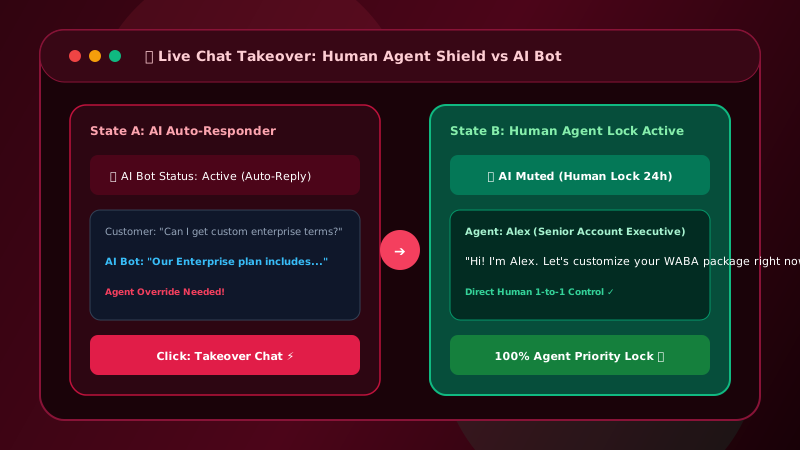
Automated AI auto-responders provide 24/7 instant replies, but complex sales inquiries require human expertise. Patify provides a 1-click Human Agent Takeover Shield (AGENT_HANDLED) to pause AI and let agents chat seamlessly.
Table of Contents
AI vs. Human Support: Finding the Perfect Balance
AI auto-responders excel at providing 24/7 instant answers to repetitive questions (pricing, hours, location, catalog downloads). However, when a lead expresses intent to buy, negotiate terms, or report a complex issue, a human agent must take over immediately.
If an AI bot continues generating auto-replies while a human agent is actively typing, it creates confusing, unprofessional experiences for the customer. To structure your team for live chat support, see our Multi-Agent Live Chat Setup Guide.
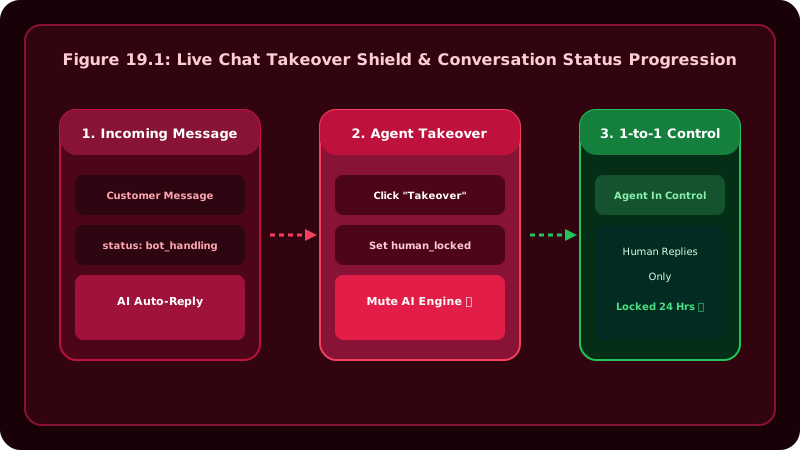
Patify's Live Chat Takeover Shield
Patify resolves this through the ConversationStatus Backed Enum (OPEN, CLOSED, AGENT_HANDLED):
- 🤖 AI Active Mode (
OPEN): Inbound customer messages pass through Patify's AI Vault driver, providing 24/7 intelligent answers based on your trained business persona. - 👨💻 Agent Active Mode (
AGENT_HANDLED): When a human support rep clicks"Assign to Me"or types a message in the chat drawer, Patify instantly sets the thread status toAGENT_HANDLED. - AI Suppression Shield: While in
AGENT_HANDLEDstate, the AI auto-responder is paused, ensuring zero bot interruptions while human reps negotiate with the client.
While handling an escalated conversation, agents can coordinate behind the scenes using Internal Staff Notes without the customer seeing private team discussions.
Multi-Agent Queue Controls
Support reps and sales teams leverage built-in Filament management controls:
- 1-Click Claiming: Tap
👤 Assign to Meto claim an inbound lead instantly. - Queue Filtering: Switch between
👤 Assigned to Me(personal tickets) and📥 Unassigned Chats(triage queue). - Reassignment: Reassign tickets to specialized colleagues (e.g. Sales, Technical Support) without dropping context.
- Emergency Escalation: Pair queue filters with Real-Time Telegram Alerts so team leads receive instant notifications when leads wait unattended.
Equip Your Support Team with Live Chat
Patify supports multi-agent shared inboxes with 1-click takeover shield