How to Create, Submit & Get Your First WhatsApp Message Template Approved by Meta
Meta requires all outbound broadcast messages to use pre-approved templates. Templates have strict naming rules (lowercase + underscores only), fixed structure (header, body, footer, buttons), and a review window of 2–24 hours.
Table of Contents
Why Meta Requires Pre-Approved Templates
Unlike email marketing where you can send any content at any time, Meta implements a strict anti-spam gateway for WhatsApp. To initiate a high-volume broadcast or message a customer outside the 24-hour service window, you must use a pre-approved template.
This process protects users from spam and ensures your business maintains a high Quality Rating.
Anatomy of a WhatsApp Template
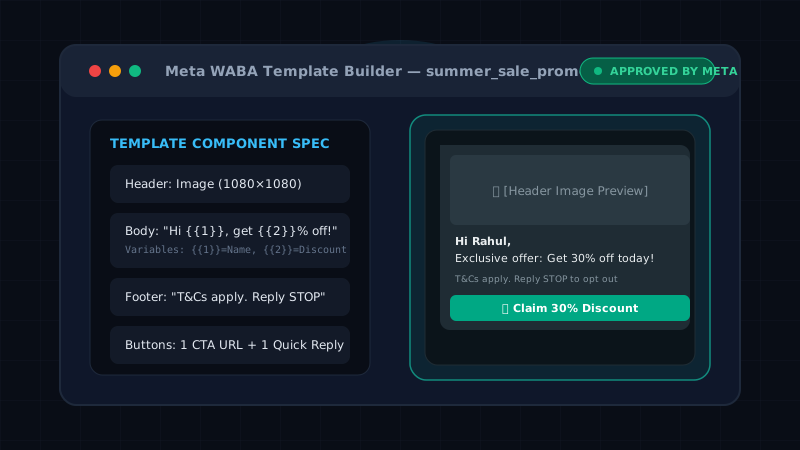
A template is composed of four distinct sections:
- Header (Optional): Can contain text (max 60 characters), an Image, a Video, or a PDF document.
- Body (Required): The main message text (max 1024 characters). Supports dynamic placeholders like
{{1}}. - Footer (Optional): A short, muted text block at the bottom of the message (max 60 characters). Useful for disclaimers like "T&Cs apply."
- Buttons (Optional but Recommended): Interactive Call-To-Action (URL/Phone) or Quick Reply buttons.
Template Naming Rules (Crucial!)
Meta enforces strict formatting for template names. A single mistake will cause an instant rejection:
- Only lowercase letters are allowed.
- Only underscores (
_) are allowed (no spaces or hyphens). - Must be descriptive.
summer_sale_promo_v1is accepted.template_1will be rejected.
The 3 Template Categories
When submitting, you must categorize your template correctly (this impacts your cost per message):
- Marketing: Promotional offers, announcements, re-engagement campaigns.
- Utility: Order confirmations, shipping updates, account alerts. (Must not contain any promotional language).
- Authentication: OTPs and security codes.
Dynamic Variables & Personalization Engine
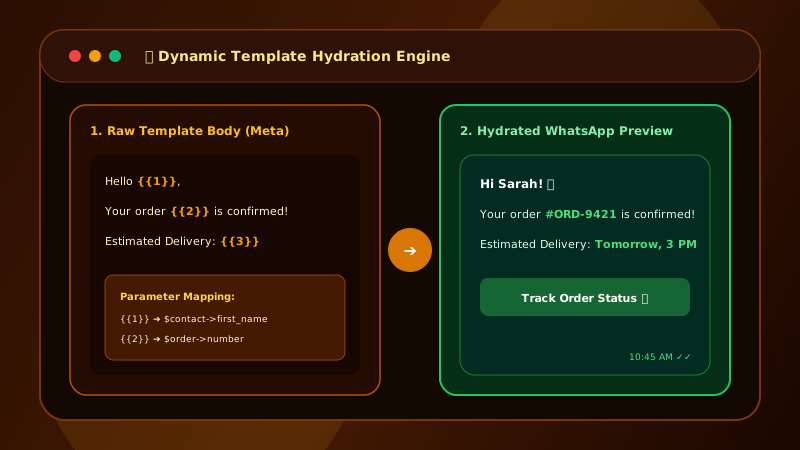
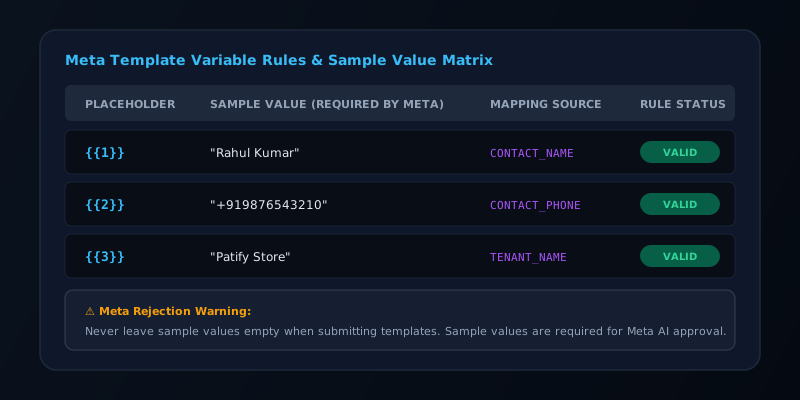
Use placeholders like {{1}} and {{2}} in the body of your template to inject dynamic data (e.g., "Hi {{1}}, your account {{2}} is active!").
In Patify's Campaign Builder, template variables are mapped directly using the TemplateVariableSource Backed Enum. You can map parameter {{1}} to CONTACT_NAME, {{2}} to CONTACT_PHONE, or {{3}} to TENANT_NAME. At runtime, Patify's campaign dispatch engine hydrates these variables dynamically per recipient.
Warning: Meta requires you to provide a "Sample Value" for each variable during submission (e.g. Rahul Kumar for {{1}}). Missing sample values result in instant AI submission rejections.
Common Rejection Reasons
- Category Mismatch: Submitting a promotional message under the "Utility" category to save money.
- Floating Variables: Placing variables at the very start or end of the message without surrounding context.
- Missing Opt-Out: Failing to include a clear opt-out path in Marketing templates.
Approval Timeline
Template reviews typically take between 2 to 24 hours. Verified businesses with a Green Quality Rating often receive automatic instant approvals for standard templates.
Create Your First Template in 5 Minutes
Patify's built-in template creator catches Meta naming errors before submission