The Complete Guide to Importing & Cleaning Your WhatsApp Contact List (E.164 Format)
A dirty contact list is the #1 cause of Quality Rating drops. Every phone number must be in strict E.164 format (+919876543210). Deduplication and opt-in verification must happen before any broadcast.
Table of Contents
Why E.164 Format Matters
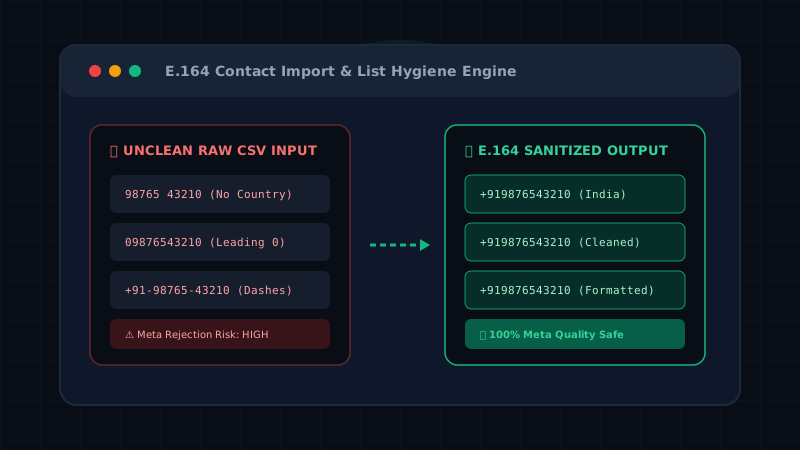
Before launching a WhatsApp broadcast campaign, your contact list must be flawlessly formatted. Meta's API does not auto-correct local phone numbers. If you send messages to improperly formatted numbers, the API rejects them silently, which negatively impacts your Meta Quality Rating.
The global standard for WhatsApp API is E.164 format.
E.164 Format Rules
Every number must strictly adhere to this structure: +[country code][subscriber number]
- Must include the
+prefix (some CRMs drop this, ensure your CSV exports correctly). - Must include the country code.
- No spaces, dashes (
-), or brackets (()). - No leading zeros in the subscriber number (e.g., UK numbers drop the leading 0).
- Maximum of 15 digits.
Common Country Code Reference
- India:
+91(e.g., +919876543210) - UAE:
+971(e.g., +971501234567) - United States / Canada:
+1(e.g., +15551234567) - United Kingdom:
+44(e.g., +447700900077)
Common Mistakes to Avoid
| Mistake | Example | Correction |
|---|---|---|
Missing + |
919876543210 | +919876543210 |
| Local Format (No Country Code) | 9876543210 | +919876543210 |
| Spaces or Dashes | +91-98765 43210 | +919876543210 |
| Leading Zero after Country Code | +4407700900077 | +447700900077 |
CSV Structure & Deduplication
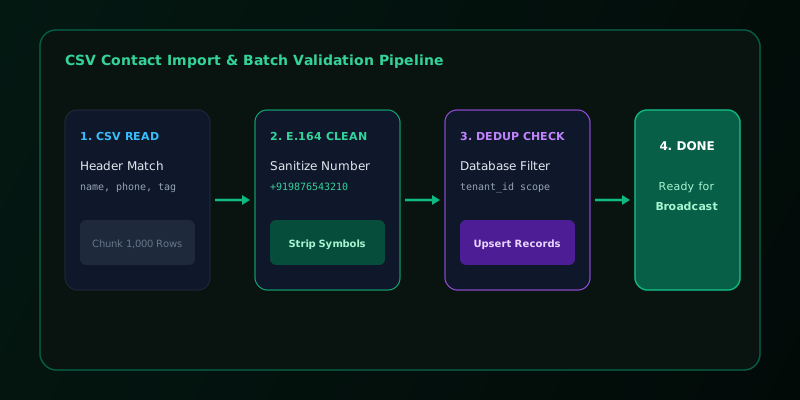
When preparing your list, ensure your CSV file is saved with UTF-8 encoding to preserve special characters in names. At a minimum, you need a phone column. Optional columns like first_name or tags help with audience segmentation.
Deduplicate before importing: Sending duplicate messages wastes your API quota and annoys customers. Clean your list in Excel/Google Sheets first.
ImportHealthShield). Upload your raw CSV, and Patify automatically quarantines invalid formats, deduplicates phone numbers, checks WhatsApp existence via Meta API, and generates 1-click downloads for Clean CSV and Invalid CSV lists.
List Hygiene & GDPR Compliance
Never import purchased or "cold" lists. Meta strictly monitors user feedback; unsolicited broadcasts will result in immediate account suspension. Ensure every contact has explicitly opted-in (review our GDPR Compliance Guide).
Implement a quarterly hygiene routine: purge contacts that repeatedly bounce or have been inactive for over 90 days to maintain a pristine delivery rate.
Ready to Scale Your WhatsApp Marketing?
Access Meta WABA official API, automated broadcast campaigns, and multi-agent live chat for your enterprise.